On this page
Call of Duty games from Modern Warfare (2019) on, Warzone included, keep their progress and items on one Activision account, played through linked PlayStation, Xbox, Steam or Battle.net accounts. Whoever controls its email inbox or a linked platform account can get back in. When you finish, the email, password, 2FA, phone number and linked platform accounts should all be yours.
If you bought a Call of Duty: Mobile account, follow our Call of Duty: Mobile guide instead.
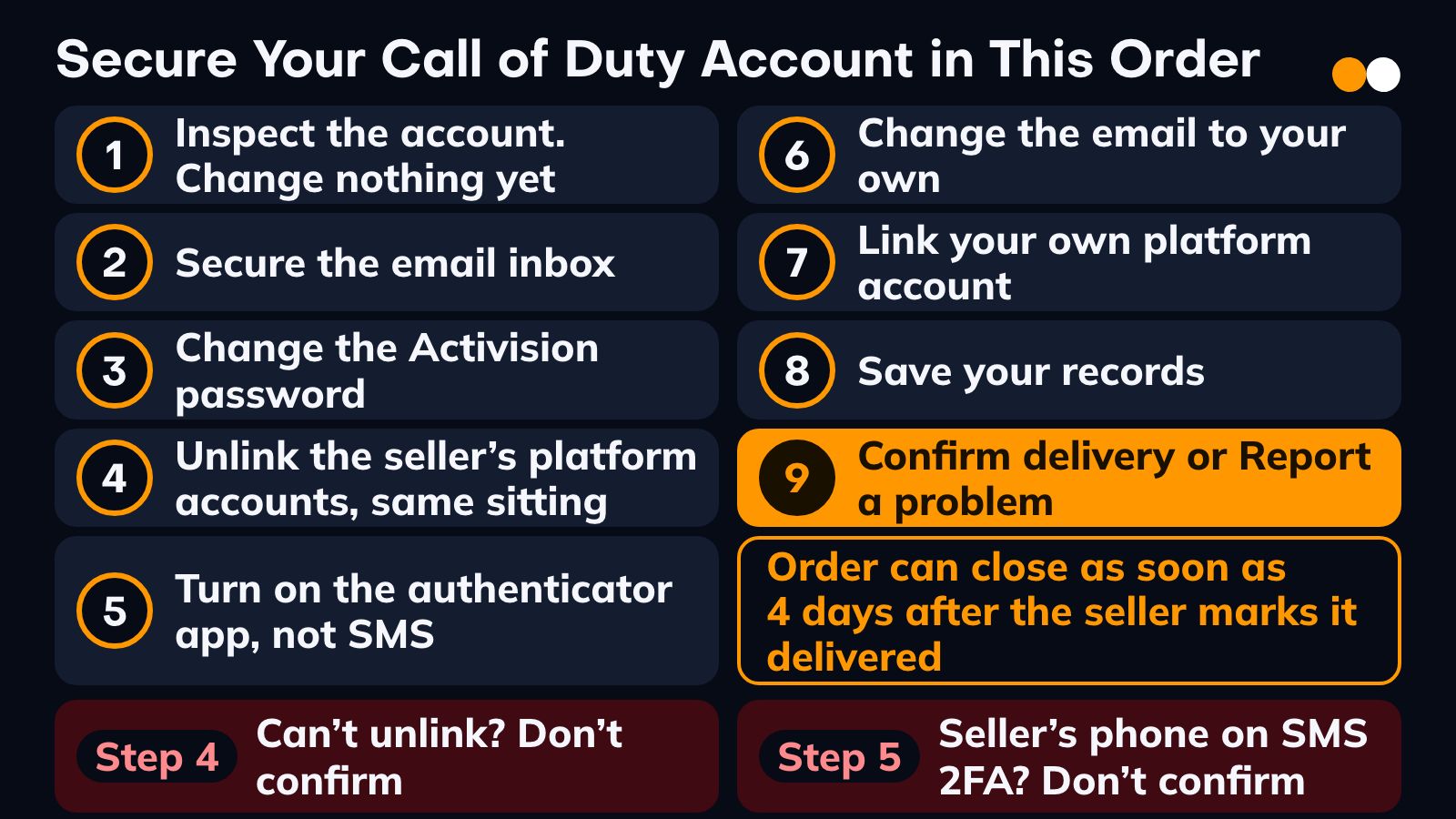
If you bought a Call of Duty, Warzone, Modern Warfare II, Modern Warfare III or Vanguard account on igitems, finish all the steps below before you press Confirm delivery. Follow them in order, because each step relies on the one before it. The biggest trap is a seller’s platform account left linked, which can change the password and email, or even delete the account.
How Activision Account Security Works
The email inbox. Password reset links go only to the account email. Activision also emails a code to verify new links and changes to your account details, and it emails your 2FA backup codes there.
Linked platform accounts. A linked PlayStation, Xbox, Steam or Battle.net account can sign in and change the password and email.
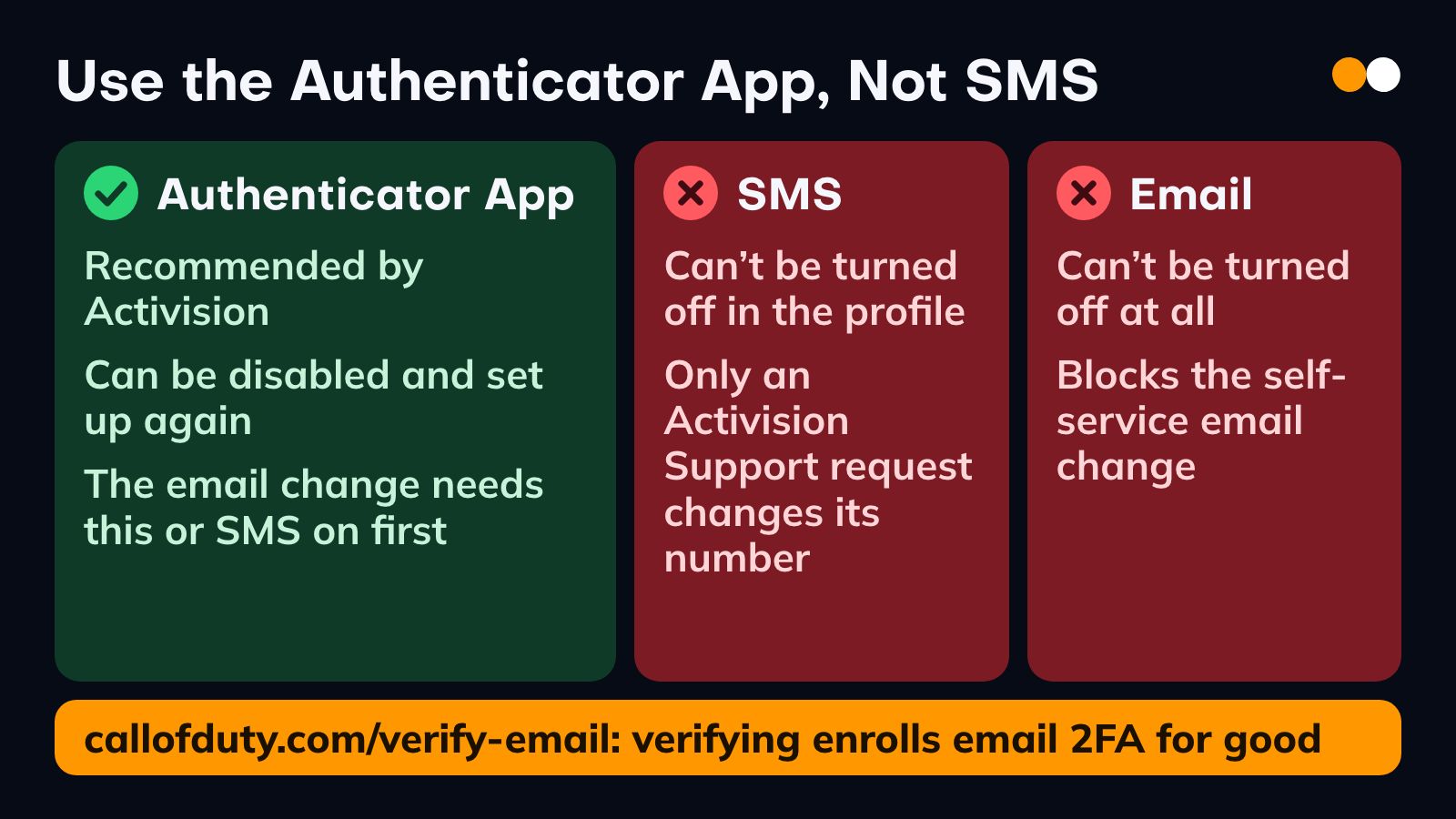
2FA. The methods are Authenticator App, SMS and Email, and Activision recommends the app. Once on, SMS 2FA can’t be turned off in the profile, and email 2FA can’t be turned off at all.
Five Mistakes to Avoid
Don’t leave the seller’s platform accounts linked. Any one of them can change your password and email, or delete the account.
Don’t unlink or link platform accounts by trial and error. Each platform account can be unlinked only once every 12 months.
Don’t add SMS 2FA, and don’t verify your email for the free camo. SMS 2FA can’t be removed in the profile, and verifying puts the account into email 2FA for good.
Don’t accept the seller’s backup codes as a finished step. They can keep a copy. Only codes you generate yourself count.
Don’t confirm delivery just because the game opens. A working login doesn’t mean the seller has lost access.
Step 1: Inspect the Account (Change Nothing Yet)
Don’t change any setting in this step. If something is wrong, you want to know before you unlink anything or touch the email.
Sign in to your Activision account with the details you received. If Activision asks for a code from an email, phone or app you don’t control, ask the seller for it in the order chat. Don’t use any reset or recovery option.
The seller must unlink the platform accounts they keep, turn off their authenticator app and remove their phone before delivery. Check each item:
Listing match. Progress, items and platforms match the listing.
Bans. Sign in on the Ban Appeal page to see the account’s enforcement status. Hardware bans don’t show there. Check them in the game.
Email. Hover over your display name and open Basic Info. The email should be the one you were given.
2FA and phone. In the Privacy & Security tab, under Two-Factor Authentication, note which methods are on. An app or SMS number you didn’t set up is the seller’s.
Linked platform accounts. Open Linked Accounts and write down every account listed. A platform login delivered with the order is yours to keep (Step 4). Ask the seller in the order chat which of the others are theirs.
Email history. Ask the seller in the order chat when the email was last changed. If it changed in the last 12 months, you can’t change it again yet, so plan on the Step 6 exception.
Found a ban or anything the listing didn’t mention? Stop here. Tell the seller in the order chat and follow What to Do If Something Looks Wrong below.
Step 2: Secure the Email Inbox
If the account came with its email login, secure that mailbox now, because Activision sends codes there. If the account email was always yours, go to Step 3. No inbox login? Ask the seller in the order chat, and don’t confirm delivery until it’s resolved.
Got a public inbox such as yopmail.com? Anyone who knows the address can read it, so it can’t be secured. Before you change anything, ask the seller in the order chat to move the account to a fresh email you control. Otherwise skip the list below and do Steps 3 to 6 in one sitting. Don’t confirm delivery until Step 6 moves the account off it, and use Report a problem before the order closes if it can’t.
Add your new recovery details before you remove the old ones. Old details can keep working for a while. Google may send codes to previous recovery info for 7 days, and Microsoft keeps a removed sign-in method usable for 30 days.
Sign in to the mailbox and change its password.
Add your own recovery email and phone number, then remove the old ones.
Turn on two-step verification with the email provider.
Review the active sessions and remove any device you don’t recognize.
Also delete any forwarding rule to an address you don’t own.
Step 3: Change the Activision Password
Read this before you start:
Your first change will probably put the account into email 2FA. Activision verifies changes with a code sent to the account email, and verifying your email that way enrolls an existing account in email 2FA, which can’t be turned off. That’s expected. Change the password anyway.
Changes can be held back. Activision may delay, restrict or deny changes after suspicious logins or excessive changes. If a change is refused, tell the seller in the order chat before the order closes.
Open Basic Info and select Edit next to your password.
Enter a new password you’ve never used anywhere else, twice, and save it. Activision recommends using all 30 characters allowed.
No Edit option? Request a reset link on Activision’s forgotten password page. It goes to the account email and expires after 24 hours.
Code going to an email or phone you don’t control? Ask the seller in the order chat, and don’t confirm delivery until it’s resolved.
Step 4: Unlink the Seller’s Platform Accounts
Do this straight after Step 3, in the same sitting. A linked PlayStation, Xbox, Steam or Battle.net account signs in without the password, so your new one doesn’t stop it.
Read this before you unlink anything:
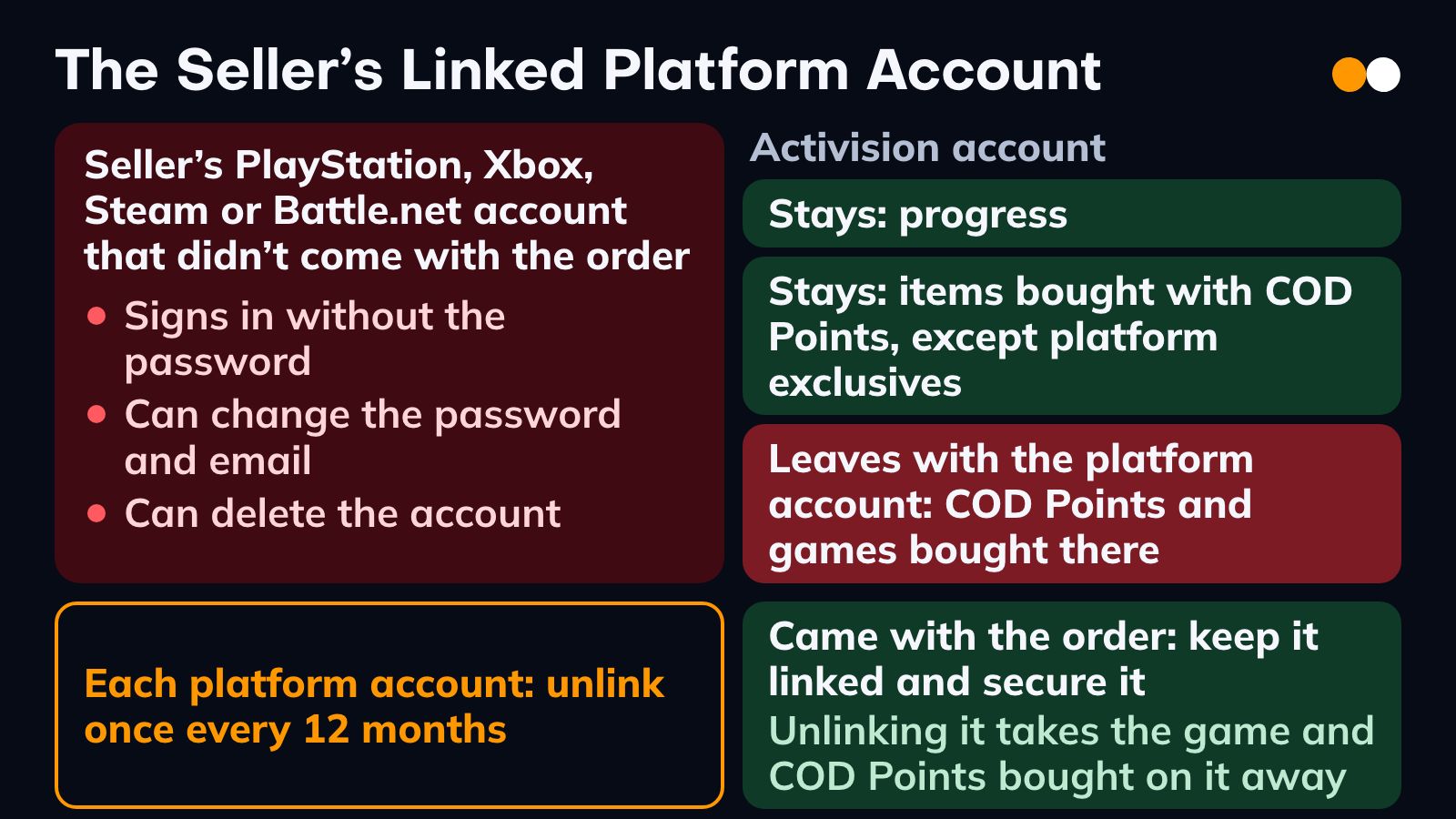
Each platform account can be unlinked once every 12 months. An active enforcement may block unlinking, and Activision may deny it after suspicious attempts.
Your progress stays. Unlinking doesn’t remove it from the Activision account.
Some purchases leave with the platform account. COD Points work only on the platform where they were bought, like most real-money content, and a game owned on the seller’s platform account leaves with it. Items bought with COD Points stay, except platform exclusives.
Open the Linked Accounts tab.
Select Unlink next to each seller account that didn’t come with the order, check the confirmation box and select Continue.
Reload and check that only your own accounts are left.
You might also like
Browse all Call of Duty Accounts






If a Platform Account Came With the Order: Keep It and Secure It
A PlayStation, Xbox, Steam or Battle.net login delivered with the order is yours. Keep it linked. Unlinking it takes the game and COD Points bought on it away from the account. While it’s linked, it can sign in to your Activision account, so secure it in this sitting:
Change its password, and make sure its email is one you control.
Turn on its own two-step protection with your own phone or app.
Remove the seller’s phone and authenticator. On Battle.net, a phone on Phone Notifications can approve a password reset and remove an authenticator, and removing that phone without it takes a Blizzard ticket.
Can’t remove the seller’s phone or authenticator? Ask the seller in the order chat, and don’t confirm delivery until it’s resolved.
If You Can’t Unlink a Seller’s Platform Account, Don’t Confirm
While it stays linked, the seller can sign in with it, change your password and email, or delete the account. It can’t be unlinked within 12 months of its last unlink, and an active enforcement can block it.
Don’t press Confirm delivery.
Tell the seller in the order chat.
If it isn’t resolved, use Report a problem on the order page (how disputes work) before the order closes.
Step 5: Turn On the Authenticator App
The email change in Step 6 needs Authenticator App or SMS 2FA on first. Use the app, because only the app can be disabled and set up again later.
Read this before you start:
Don’t turn on SMS 2FA. It can’t be disabled in the profile, and only an Activision Support request, which may be denied, changes its number. The exception is free-to-play Warzone on PC (see Warzone on PC and SMS 2FA).
Don’t verify your email at callofduty.com/verify-email. It offers a camo, but it enrolls the account in email 2FA for good, which blocks the self-service email change.
Install Authy, Duo Mobile, Google Authenticator or Microsoft Authenticator on your own phone.
Open Privacy & Security, go to Two-Factor Authentication and select Enable in the Authenticator App row. If the app is already on, it’s the seller’s, so replace it as shown below.
If asked to verify, select Send Code, enter the code from the account email and select Verify.
Add the account to your app, enter the app’s 6-digit code and your password, then select Activate.
Save the ten single-use backup codes away from the phone with the app.
Select the three dots in the Authenticator App row and choose Set As Primary Method.
Activision also emails these backup codes to the account email. If the seller could read that inbox, you’ll replace them at the end of Step 6.
If the Seller’s Authenticator App Is Already On: Replace It
Select the three dots in its row, choose Disable Method, enter your new password and select Confirm. Then enable it with your own app as above. Asked for a code from the seller’s app? Ask the seller in the order chat, and don’t confirm delivery until it’s resolved.
If the Seller’s Phone Is on SMS 2FA, Don’t Confirm
Making your app primary doesn’t remove the seller’s number, so it stays a working 2FA method. It can’t be switched off in the profile, and only an approved Activision Support request changes the number.
Don’t press Confirm delivery.
Tell the seller in the order chat.
If it isn’t resolved, use Report a problem on the order page (how disputes work) before the order closes.
Step 6: Change the Activision Email to Your Own
Use your own email here, even if the account came with a mailbox. A previous owner may keep recovery access to that mailbox for a while.
Read this before you start:
You get one change a year. The email can be changed once every 12 months, with Authenticator App or SMS 2FA on.
Email 2FA blocks this step. An account in email 2FA can’t change its email through account management. Accounts created after August 18, 2026 start in it, and older ones join when you verify your email to make a change, as Steps 3 to 5 may have done.
In Basic Info, select Edit next to the email address.
In the Account Verification Required pop-up, select Send Code and enter the code sent to the current email.
Enter your new email and select Save, then enter your Activision password and select Save.
In the email sent to your new address, select Verify Your Email Address.
Reload Basic Info and check that your new email is shown.
Code going to an email you can’t reach? Ask the seller in the order chat, and don’t confirm delivery until it’s resolved.
If the seller could read the old inbox, reset the app now: Disable Method, then Enable again for ten new codes, which go to your new email. Then check that the app is still your primary method.
If There’s No Edit Option or the Change Is Blocked: The Inbox Is Your Master Key
In email 2FA, only Activision Support can change the email, and Support may be unable to change account details. An email changed in the last 12 months can’t change again until they’ve passed.
You don’t need that change before you confirm, unless the inbox is a public one. The inbox you secured in Step 2 is now the master key to the account: email 2FA can never be removed, so it stays a working sign-in method, and every reset link and backup-code email goes there. So before you confirm, finish every item in Step 2, forwarding rules included, and the rest of the Step 9 checklist.
If you can’t finish those, tell the seller in the order chat and use Report a problem before the order closes. Moving the account to your own email later is an optional Activision Support request.
Step 7: Link Your Own Platform Account
Only one account per provider can be linked, so this comes after Step 4. If you kept a delivered account for a platform, skip that platform. Link only an account you’ll keep, since unlinking it is also limited to once every 12 months. Linking a PC account that doesn’t own a recent Call of Duty title? Read Warzone on PC and SMS 2FA first.
Sign in to your platform account, then to your Activision account in the same browser.
Open Linked Accounts and select Link Account next to the platform.
Select Send Code, enter the code sent to the account email, and finish on the platform’s website.
Step 8: Save Your Records
Keep these somewhere safe and offline:
Your igitems order details
Your Activision backup codes
The account’s display name and the email now on it
The platform accounts you linked, and when. Activision’s hacked-account recovery asks for a linked platform account and the email last used.
Step 9: Confirm Delivery or Report a Problem
Press Confirm delivery only when all of this is true:
The account matches the listing, with no ban or other problem it didn’t mention.
If an email inbox came with the account, you secured it, unless it was a public one.
You changed the Activision password.
Every seller platform account is unlinked, and any that came with the order is secured as in Step 4.
The authenticator app is on with your own phone and set as primary, and you saved backup codes issued after the seller lost access to the account email.
The seller’s phone isn’t an SMS 2FA number on the account.
The Activision email is now your own.
You saved your records.
The only exception: if Activision won’t let you change the email yourself, you can confirm with the delivered inbox as the account email, once you’ve fully taken it over as Step 6 describes. That inbox is then the master key to the account. This never applies to a public inbox.
If any of this isn’t true, don’t confirm. Go to What to Do If Something Looks Wrong.
Don’t wait if you’re stuck. An order can close automatically as soon as 4 days after the seller marks it delivered, so use Report a problem before then.
After You Confirm
Read every security alert. If one shows a sign-in or device that isn’t yours, follow What to Do If Something Looks Wrong right away.
Keep your backup codes and order record offline. The codes get you in if you can’t use your authenticator app.
Still on the delivered inbox? Recheck its recovery details, devices and forwarding rules after 30 days, when old recovery details have stopped working.
Warzone on PC and SMS 2FA
Activision requires SMS 2FA on any PC platform account that doesn’t own a Call of Duty title from the last two years, per platform account.
Fresh free-to-play PC accounts. Accounts created in the game on PC must add a text-enabled phone number to play, so they usually arrive with the seller’s number as SMS 2FA. Don’t confirm (Step 5).
Your own PC account. If it doesn’t own a recent title, Activision blocks free-to-play play until you verify a phone number for SMS 2FA. Use a number you’ll keep, because it can’t be removed, and keep your app as primary.
Scam Checklist
Never give anyone your password, verification codes or backup codes.
Never approve a sign-in you didn’t start.
Ignore anyone claiming to be Activision Support who contacts you first, on Discord or any other chat. Activision warns that unofficial channels can lead to account fraud. Official support is only at support.activision.com.
If a seller asks for a code after handover, refuse and tell us through Report a problem or the Help Center.
Avoid websites or apps offering free COD Points or items. Activision warns against offers of COD Points and other in-game items.
Don’t use cheats or other third-party software. Penalties land on the account no matter who was playing.
Good to Know Before You Play
Activision’s rules don’t allow accounts to be bought, sold or transferred, and that includes the account you bought. Its Terms of Use say:
“Activision does not recognize the transfer of accounts or Service Provided Content. You may not purchase, sell, resell, lend, rent, gift, trade or otherwise transfer any account or Service Provided Content”
You inherit the account’s record. Activision’s enforcement policy says “The account holder is responsible for any infraction on the account.” Bans are only overturned if Activision finds the account was hacked.
COD Points the seller bought can be taken back. Refunds go through the store where the points were bought, and points are removed after a refund or chargeback.
The previous owner may still be able to recover the account. Activision’s Hacked Account Recovery asks for the email last used on the account and a platform account previously linked to it, then works to restore the “original progress, stats, and content”. A seller whose platform account was ever linked can file that claim, even after the email, password and phone number have changed.
A platform account that came with the order can be taken back through its provider, and while it’s linked that reopens your Activision account. Valve says Steam ownership can’t be transferred and usually restores a contested account to whoever has the oldest proof of ownership. PlayStation recovers through the account email, and Microsoft’s recovery form asks for things like a console’s hardware ID. Blizzard may ask for photo ID to find the real account holder. Finishing every step here doesn’t remove that risk, and a buyer usually can’t pass the same check.
No security step can guarantee permanent access. Keep your igitems order record and your backup codes safe.
What to Do If Something Looks Wrong
If you see activity you don’t recognize, follow Activision’s security advice:
Log in and change your password right away.
Unlink any linked account you don’t recognize. Each unlink uses that platform account’s once-in-12-months allowance.
If an account you unlinked is yours, change its password. Then check that the email, authenticator app and linked accounts are still yours.
Bought on igitems and stuck, locked out or seeing a problem?
Tell the seller in the order chat first. Activision doesn’t recognize account transfers, so don’t contact Activision Support about a purchased account without speaking to the seller.
If it isn’t resolved, don’t confirm delivery. Use Report a problem on the order page (how disputes work) before the order closes automatically, and our team will help.
If the order is already completed and hasn’t had a dispute, you can still use Report a problem on the order page within 14 days. That includes COD Points or items that disappear.
Our 24/7 Help Center is also there if you need it.
Frequently Asked Questions
What if Activision won’t let me change the email?
Often your first change puts the account into email 2FA, and then only Activision Support can change the email. Step 6 explains how to confirm on the delivered inbox instead.
Can the seller or a previous owner take the account back?
It’s possible. These steps close the normal ways in, but Activision’s Hacked Account Recovery can return the account to someone with a previously linked platform account and the email last used on it. Keep your order record.
When should I confirm delivery?
Only after you finish the steps and everything on the Step 9 checklist is true. If something isn’t right, don’t confirm. Use Report a problem on the order page.