Securing your newly purchased Mobile Legends: Bang Bang (MLBB) account is crucial to keeping it under your control. Follow this step-by-step guide right away to ensure maximum protection.
Step-by-Step Security Guide
Step 1: Bind to a Strong, Permanent Account
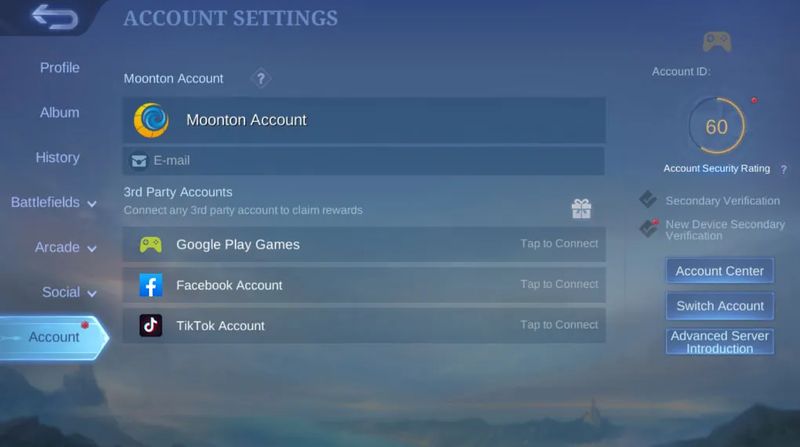
The first thing you should do is bind your MLBB account (if it isn’t already) to a Moonton account. This option is far more secure and recovery-friendly than using social logins.
Navigate to Profile → Account → Tap to Connect → Moonton Account
Register or link using your email, then confirm through Moonton’s verification email
Once bound, a Moonton account cannot be unbound
You can also bind your account to Facebook, Google, or Apple ID — but Moonton is the most reliable choice.
Step 2: Change Passwords & Secure Linked Accounts
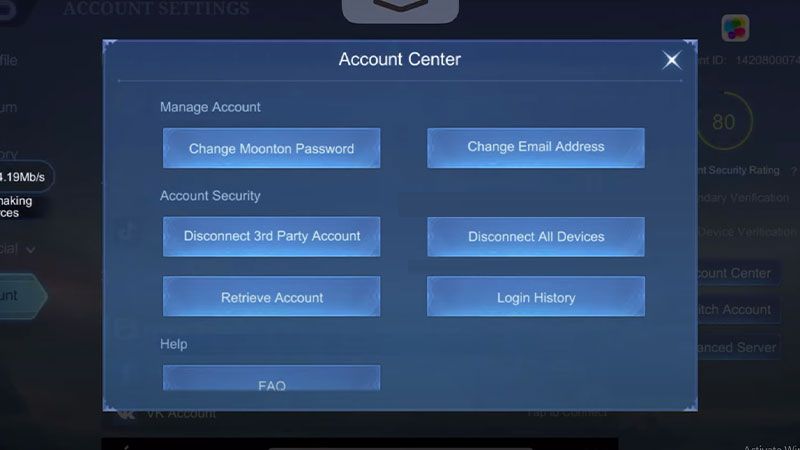
Reset your Moonton account password with a strong, unique password
Secure the email linked to Moonton with two-factor authentication (2FA)
Update passwords and enable 2FA for Facebook, Google, or Apple ID if linked
Remember: These linked accounts are your real master keys to MLBB.
You might also like
Step 3: Activate Secondary Verification & New-Device Codes
Go to Profile → Account Settings
Enable PIN-based Secondary Verification for linking, gifting, and other sensitive actions
Turn on New Device Secondary Verification, which sends a code to your email whenever you log in from a new device
✅ Even if someone has your password, these steps prevent unauthorized logins.
Step 4: Monitor Login History & Log Out Unknown Devices
Regularly check your Login History or Device Records in account settings
If you notice unknown devices, log them out immediately and change your password
Resetting your password also forces a logout from all devices
Step 5: Guard Against Phishing & Scams
Ignore emails or messages offering free diamonds, skins, or account boosts — these are scams
Moonton will never ask for your password or verification codes via email
Always double-check sender addresses and avoid clicking suspicious links
What to Do If You Lose Access
Even with all precautions, you might face login or ownership issues. Here’s what to do:
1. Try In-Game Recovery First
Use the Account Recovery or Support option in MLBB
Prepare evidence: account ID, server, purchase receipts, and device information
2. Check Your Linked Accounts
Reset passwords and secure your email, Moonton, Facebook, Google, or Apple ID
This often restores access if the login method was compromised
3. If Access Still Fails → Act Fast on igitems
Open a dispute immediately
The seller will be notified to help
If unresolved, the igitems dispute team will step in until the case is closed fairly
⏱️ Act quickly — the sooner you report, the easier it is to recover ownership.
Best Practices (Quick Summary)
Always use strong, unique passwords
Secure your email and logins with 2FA
Avoid logging in on public or shared devices
Stick to one device for the first week after purchase
Be alert for phishing — when in doubt, don’t click
What if I can’t secure the account?
Open a dispute on igitems right away. The seller will assist, or our dispute team will help resolve it.