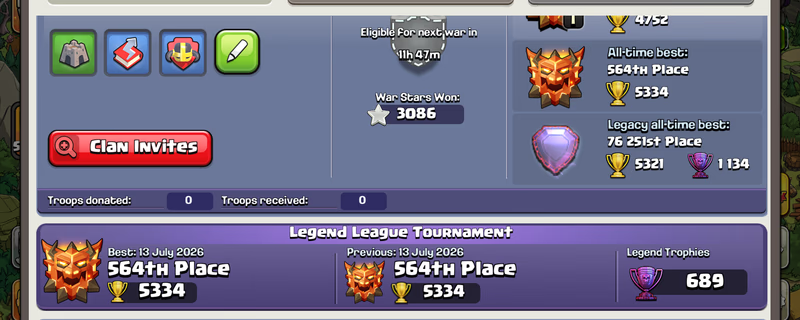
Global Rank 564 | TH18 Max | 16 Epic Equipment | Rare Statues | Dream Account | Ready for TH19
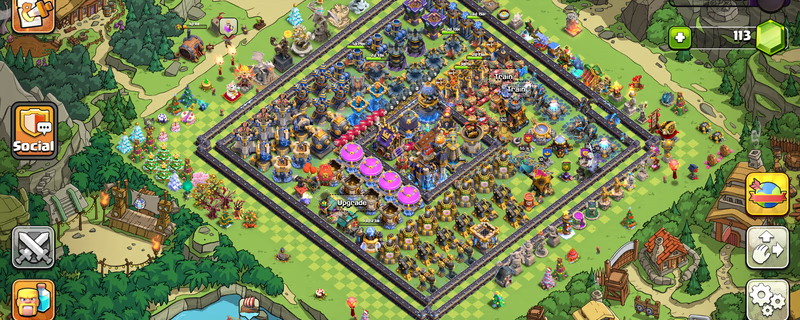
Product image 1
Product image 2
1 / 5
Koguhind
€288.90
Kohaletoimetamine
Instant
E-posti juurdepääs
Täielik kontroll
Teeni ≈ €11.5 rahatagastus
Kiired maksevõimalused
Makse hoitakse deponeerituna
Sinu makse jääb igitems kätte ja vabastatakse alles pärast seda, kui oled tarne kinnitanud.
100% raha tagasi garantii
Kui sinu tellimust ei tarnita või see ei vasta kirjeldusele, saad raha täies ulatuses tagasi.
24/7 vaidluste lahendamine
Kui sa ei suuda müüjaga kokkuleppele jõuda, sekkub meie meeskond ja teeb õiglase otsuse.
PCI DSS sertifitseeritud maksed
Kaardimakseid töödeldakse pangataseme krüpteeritud lüüside kaudu.
Loe lähemalt igitems Shieldi kohta
Platvorm
Supercell
TownHall
18
Hero Journey
473
King
105
Queen
105
Prince
95
Warden
80
Machine
30
Copter
30
Gems
113
Rare Obstacles
Obstacle Trees and Rocks
Account Protection
Active

IMPORTANT – READ FIRST - - ️After purchasing and successfully logging into the account, it is your responsibility to secure both the email account and the Supercell account. - ️I will not be responsible for security issues caused by failing to secure the account within the required period. - ️Supercell normally requires approximately 15 days before you can change the Supercell ID email or add a phone number to Account Protection. - ️Supercell login codes may occasionally be delayed or rejected. When this happens, try requesting the code through another Supercell game such as Clash of Clans, Brawl Stars or Hay Day using the same Supercell ID. EMAIL LOGIN DETAILS Email Address: Email Password: For @ -Open the Gmail app or visit -When Google requests verification, contact me through marketplace chat. For @ -Open the Outlook app or visit GAME LOGIN 1. Open Clash of Clans or Brawl Stars or Hay Day. 2. Select “Log in with Supercell ID.” 3. Enter the provided email address. 4. Open Gmail or Outlook and copy the Supercell verification code. 5. Enter the code in the game to complete login. - ️IMPORTANT SECURITY RULES • Do not immediately change the Gmail password. • Wait at least 24 hours before attempting to change the email password. • In some cases, Gmail or Outlook may apply a security waiting period. • Wait seven days before making in-game purchases. • Do not contact Supercell Support. • Do not share the login details or verification codes with anyone. - After confirming that the game account works correctly: 1. Review the security activity in Gmail or Outlook. 2. Remove unknown recovery methods or sessions only after confirming that you can access the account safely. 3. Add your recovery email or phone number when the email provider permits it. 4. Save the updated credentials somewhere secure. Contact me through marketplace chat if you experience any login or verification issue. Responses may be delayed while I am sleeping.

Müüja

Sulle võib ka meeldida