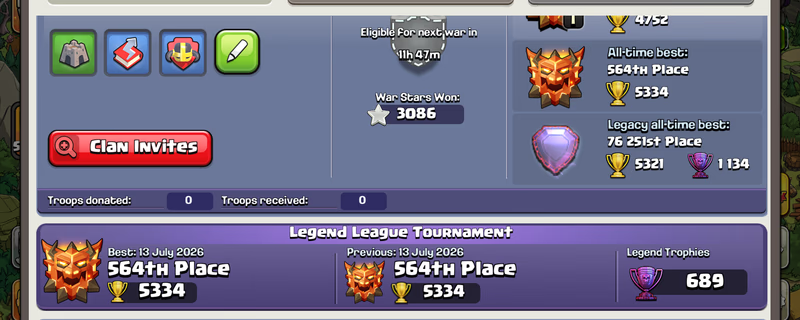
Global Rank 564 | TH18 Max | 16 Epic Equipment | Rare Statues | Dream Account | Ready for TH19
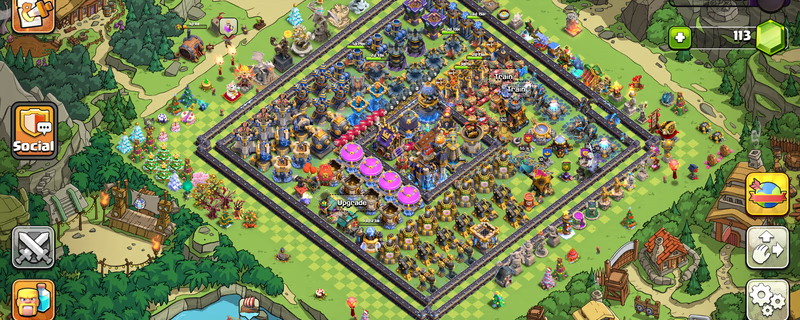
Product image 1
Product image 2
1 / 5
Totalpris
SEK 3,183.90
Leverans
Instant
E-poståtkomst
Full kontroll
Tjäna ≈ SEK 127.3 Cashback
Snabba betalningsalternativ
Betalningen hålls i deposition
Din betalning stannar hos igitems och släpps först när du har bekräftat leveransen.
100 % pengarna-tillbaka-garanti
Om din beställning inte levereras eller inte matchar annonsen får du full återbetalning.
Tvistlösning dygnet runt
Om du inte kan lösa ett problem med säljaren kliver vårt team in och fattar ett rättvist beslut.
PCI DSS-certifierade betalningar
Kortbetalningar behandlas via krypterade betalväxlar av bankklass.
Läs mer om igitems Shield
Plattform
Supercell
TownHall
18
Hero Journey
473
King
105
Queen
105
Prince
95
Warden
80
Machine
30
Copter
30
Gems
113
Rare Obstacles
Obstacle Trees and Rocks
Account Protection
Active

IMPORTANT – READ FIRST - - ️After purchasing and successfully logging into the account, it is your responsibility to secure both the email account and the Supercell account. - ️I will not be responsible for security issues caused by failing to secure the account within the required period. - ️Supercell normally requires approximately 15 days before you can change the Supercell ID email or add a phone number to Account Protection. - ️Supercell login codes may occasionally be delayed or rejected. When this happens, try requesting the code through another Supercell game such as Clash of Clans, Brawl Stars or Hay Day using the same Supercell ID. EMAIL LOGIN DETAILS Email Address: Email Password: For @ -Open the Gmail app or visit -When Google requests verification, contact me through marketplace chat. For @ -Open the Outlook app or visit GAME LOGIN 1. Open Clash of Clans or Brawl Stars or Hay Day. 2. Select “Log in with Supercell ID.” 3. Enter the provided email address. 4. Open Gmail or Outlook and copy the Supercell verification code. 5. Enter the code in the game to complete login. - ️IMPORTANT SECURITY RULES • Do not immediately change the Gmail password. • Wait at least 24 hours before attempting to change the email password. • In some cases, Gmail or Outlook may apply a security waiting period. • Wait seven days before making in-game purchases. • Do not contact Supercell Support. • Do not share the login details or verification codes with anyone. - After confirming that the game account works correctly: 1. Review the security activity in Gmail or Outlook. 2. Remove unknown recovery methods or sessions only after confirming that you can access the account safely. 3. Add your recovery email or phone number when the email provider permits it. 4. Save the updated credentials somewhere secure. Contact me through marketplace chat if you experience any login or verification issue. Responses may be delayed while I am sleeping.

Säljs av

Du kanske också gillar